


Software de automação para Windows: você descreve a tarefa em português e o agente de IA cria o robô RPA na sua máquina. Criar e consertar robôs usam o modelo de IA que você escolhe, pela sua chave de API. Se o robô quebrar, o Curador conserta.
Primeiro mês por R$ 125 Conhecer o CuratorA PYE Tech identifica onde o processo-chave da sua empresa trava e usa agentes de IA para construir os sistemas, as automações e as integrações que destravam a operação, com a velocidade que a IA trouxe para o desenvolvimento de software.
Agendar diagnóstico Ver um caso realIntegramos os seus sistemas e os robôs do Curator a um deck físico de 15 teclas. Monitore, acione e leia os logs com um toque, e veja os prazos da equipe sem abrir nenhuma tela.
Conhecer o deckDeck XL
Teclas
Ajustes
Plugins
Backup
↶ Desfazer
Mirabox XL 1 conectado
Do pedido em português ao robô em produção, sem trocar de ferramenta: o agente de IA escreve o robô em Python e trabalha no Google Chrome de verdade, o Curador conserta o robô quando ele quebra e as filas dividem o trabalho entre várias máquinas quando o volume cresce.
Você escreve o que o robô deve fazer, do jeito que explicaria a um colega. Na aba "Agente", a IA cria, altera e testa a automação no modo Build; no Plan, ela propõe o caminho e, no Chat, só explica. Ela abre o Google Chrome conectado ao Curator e, no Windows, olha a tela para entender o processo.
Você clica em "Executar" e o robô roda na máquina da sua empresa. O "Fluxo do Projeto" mostra as etapas, e a aba "Execuções" guarda o histórico e os logs. Se o robô quebrar com erro técnico, o Curador assume na hora: olha a tela, decide e conserta.
Quando o volume chega a milhares de itens por dia, o trabalho entra em uma fila: uma lista central compartilhada. Ao criar a automação, você escolhe um modelo REFRAMEWORK: o Dispatcher enche a fila, os Performers processam os itens em paralelo e o Disperformer faz as duas coisas no mesmo projeto.
Agente de IA, Curador, Google Chrome e Computer Use, extração de dados de documentos, filas e gatilhos no mesmo aplicativo. É o que uma equipe precisa para tirar a automação do papel e mantê-la rodando todos os dias.
Na aba "Agente", você descreve a rotina e a IA cria, altera e testa a automação. Build mexe no código, Plan propõe o caminho e Chat só explica. Ela olha a tela, consulta a fila e, se você conectar, lê os e-mails do Outlook clássico. Quem aperta "Executar" é você.
Criar e consertar robôs usam o modelo de IA que você escolhe, pela sua chave de API. São 9 provedores, e você pode usar um modelo diferente em cada automação. A chave fica só no seu computador, e o uso é cobrado nela, pelo provedor.
Ligue o Curador em uma automação ("Ligado nesta automação"). Se ela quebrar com erro técnico, ele assume na hora: olha a tela, decide parar ou seguir e avisa por e-mail. Depois conserta o código, testa e reexecuta os itens que quebraram. Sem conserto confirmado, desfaz o que mudou.
O agente trabalha no Google Chrome de verdade, ligado ao Curator por uma extensão: o Curator abre a janela e conecta sozinho. Fora do navegador, o Computer Use no Windows deixa o agente olhar a tela e as janelas abertas e fazer ações no desktop.
Os interpretadores leem PDFs, planilhas Excel e ofícios em etapas visuais: cada etapa extrai um campo com o modelo de IA que você escolher. Dá para trocar o modelo de uma etapa sem refazer o resto e chamar o interpretador por API ("Copiar API").
Distribui milhares de itens entre vários robôs sem duplicar: a reserva de cada item é feita de forma indivisível no banco de dados. Na aba "Filas", você acompanha os pendentes, os sucessos, as falhas e os abandonados de cada fila.
Crie um gatilho por horário ou pelos novos itens de uma fila, e a automação começa sozinha neste computador. Em "Execuções", cada rodada fica registrada com origem (manual ou gatilho), status, tokens, máquina e relatório.
Coloca vários modelos de IA na mesma tarefa e monta um ranking de acerto. Assim você escolhe, com números na mão, o modelo de melhor custo e acerto para cada automação.
Convide pessoas para o workspace com o cargo certo: Administrador, Desenvolvedor ou Operador. A janela "Uso de IA" mostra os tokens e o custo calculado por modelo, e as "Notificações" avisam quando chegam modelos novos.
As quatro abas da janela principal:
Automação Execuções Filas AgenteE nos menus e janelas do aplicativo:
Curador Gatilhos Interpretadores Benchmark Notificações Uso de IA Equipe ConfiguraçõesTelas reais do Curator 3.2.3. Do modelo de IA escolhido à fila em produção. Clique em uma tela para ampliar.
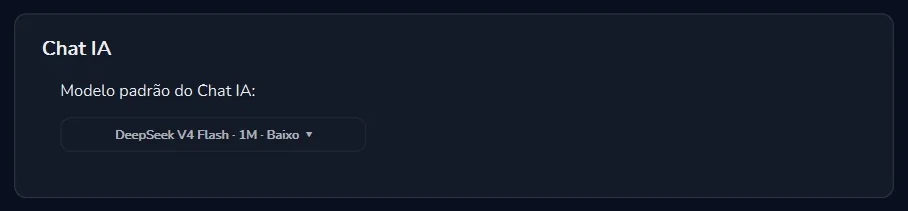
Você escolhe o modelo, de um dos 9 provedores. A chave fica no seu computador, e o uso é cobrado nela.
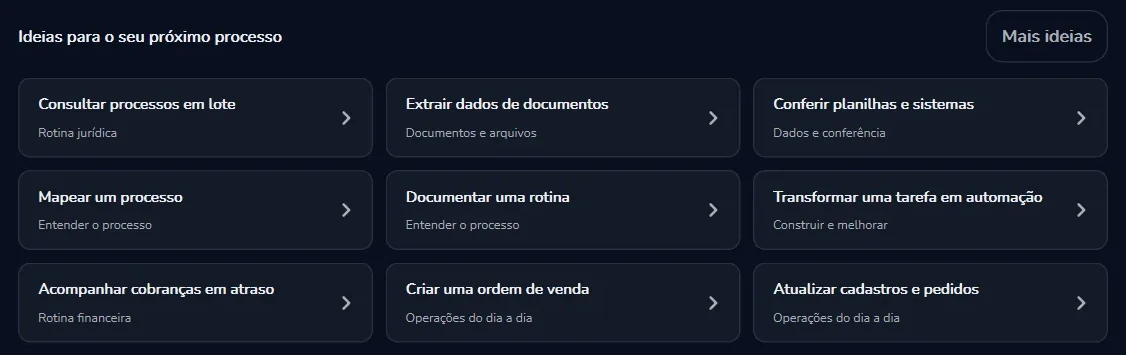
Você descreve a rotina ou escolhe uma ideia pronta. A conversa mostra os tokens e o custo calculado.
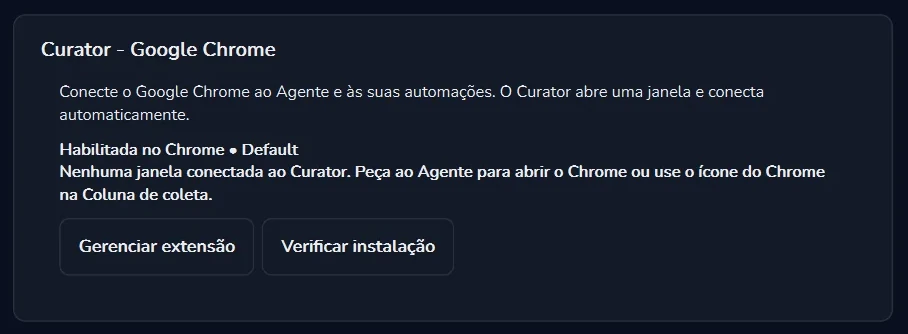
A extensão liga o seu Chrome ao Agente e às automações. O Curator abre a janela e conecta sozinho.
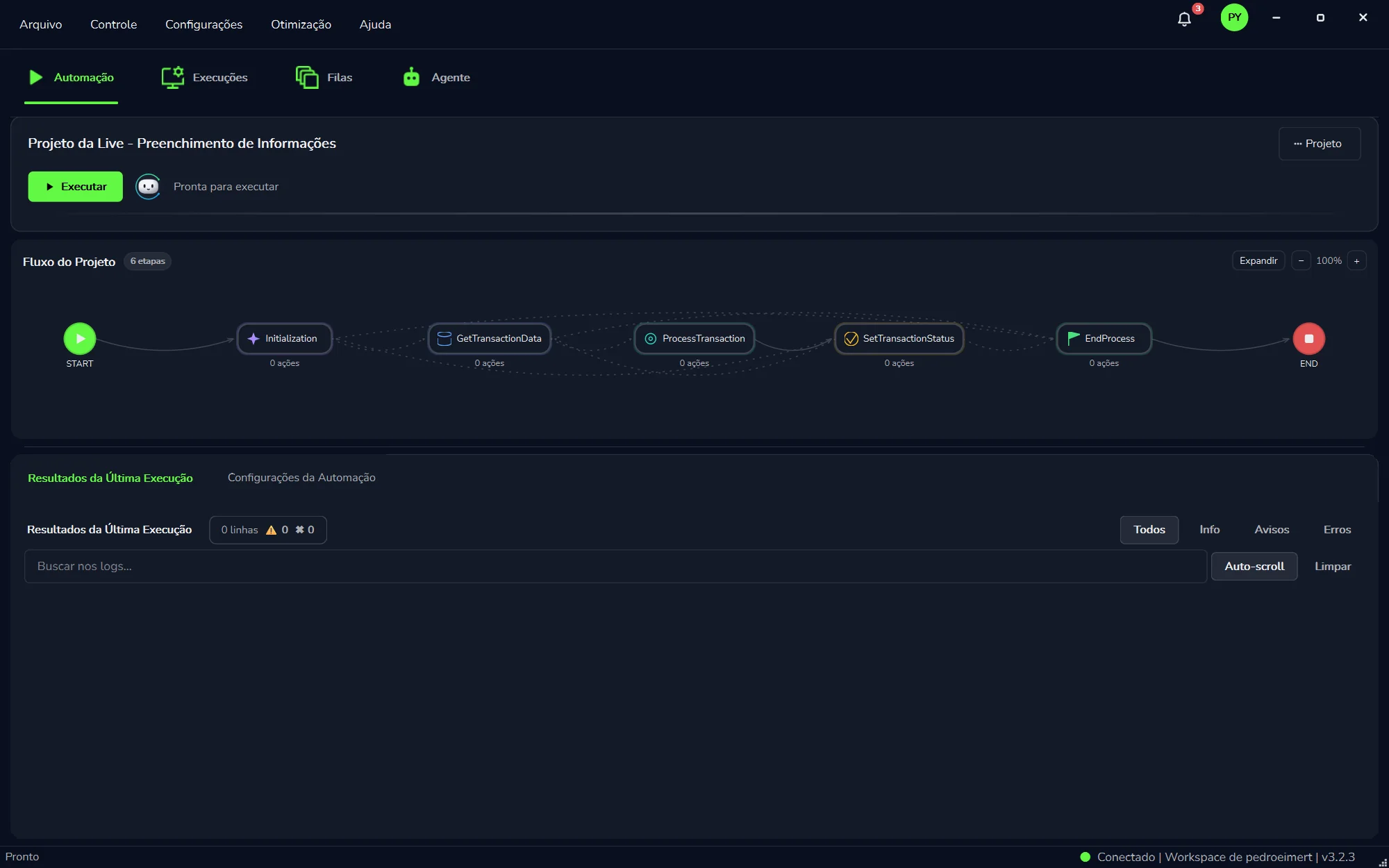
As etapas do modelo REFRAMEWORK, o botão "Executar" e os resultados da última execução, na mesma tela.
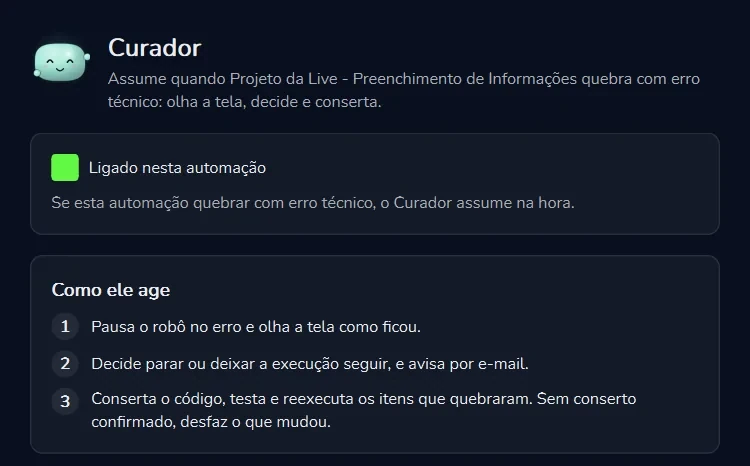
Você liga automação por automação e escolhe o modelo da sua chave de API que faz o conserto.
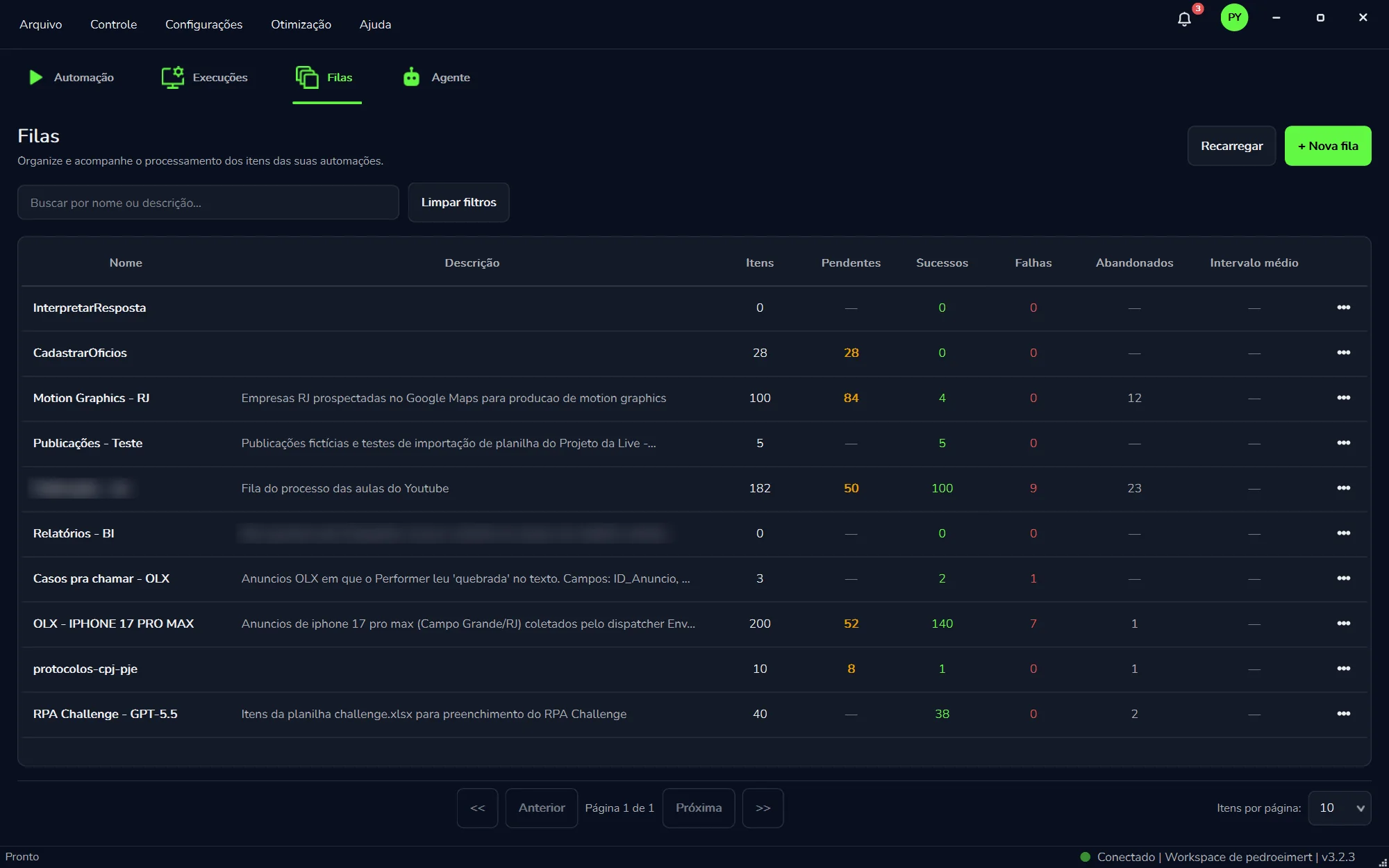
Itens, pendentes, sucessos, falhas e abandonados de cada fila. Vários robôs, sem duplicar.
Automação de processos mexe com dados sensíveis e com os sistemas mais críticos da empresa. Por isso, no Curator, o controle de acesso não é um recurso extra: ele já vem ligado.
As chaves de API ficam só no seu computador: a PYE Tech não as recebe. O uso do modelo de IA é cobrado na sua chave, pelo provedor.
Use a sua chave de API no provedor de IA que preferir. O robô opera o Google Chrome, o Excel, o Outlook clássico e arquivos PDF e CSV no Windows.
OpenAI Google Gemini Anthropic xAI DeepSeek Qwen Moonshot Z.AI CompactifAI Google Chrome Outlook clássico Windows Excel PDF CSVNada de invenção arriscada: o Curator usa as mesmas bases que as maiores plataformas de automação e de inteligência artificial do mundo.
Python LangGraph LangChain Supabase PostgreSQL Playwright CloudflareO que as empresas mais perguntam antes de criar o primeiro robô.
É usar inteligência artificial para que um robô de software faça, no computador, as tarefas repetitivas que hoje tomam o tempo da equipe: preencher sistemas, baixar relatórios, ler documentos e conferir dados. No PYE Agent Curator, a IA também cria o robô: você descreve a tarefa em português, o agente de IA escreve a automação e o robô passa a executá-la na sua máquina. Se ele quebrar, o Curador conserta.
O RPA (automação robótica de processos) segue um roteiro fixo: clica, digita e copia sempre do mesmo jeito, com rapidez e previsibilidade. Um agente de IA recebe um objetivo e decide os próximos passos. O Curator junta os dois: o agente de IA cria e corrige o robô, e o robô RPA executa a rotina do mesmo jeito todos os dias. Os planos mensal e anual também incluem agentes de propósito geral, que escolhem o próximo passo por conta própria.
Não. Em tarefas de alto volume e regras claras, um robô que segue sempre o mesmo caminho costuma ser mais rápido, mais barato e mais fácil de auditar do que consultar um modelo de IA a cada clique. O que a IA mudou foi o resto do trabalho: hoje ela escreve o robô, lê documentos sem formato fixo e, com o Curador, conserta o robô que quebrou.
Não para começar. Você descreve o que o robô deve fazer na aba "Agente", ou escolhe uma das ideias prontas, e a IA monta e testa a automação. Ela trabalha no Google Chrome de verdade, conectado por extensão, e olha a sua tela no Windows para entender o processo. O robô é escrito em Python, então quem programa pode abrir o código, revisar e ajustar o que quiser. Veja como funciona o Agente.
Criar e consertar robôs usam o modelo de IA que você escolhe, pela sua chave de API. Você conecta a chave de um dos 9 provedores e escolhe o modelo; o uso é cobrado nessa chave, pelo provedor. A chave fica só no seu computador: a PYE Tech não a recebe. A licença do Curator não inclui o uso da IA. Veja como funciona a IA pela chave de API.
O Curador é o recurso do Curator que conserta o robô sozinho. Você liga o Curador em cada automação ("Ligado nesta automação"). Se ela quebrar com erro técnico, ele assume na hora: pausa o robô no erro e olha a tela como ficou; decide parar ou deixar a execução seguir, e avisa por e-mail; depois conserta o código, testa e reexecuta os itens que quebraram. Sem conserto confirmado, ele desfaz o que mudou. Você escolhe o modelo da sua chave de API que faz o conserto, e a janela mostra o que o Curador já fez. Veja como o Curador age.
O plano mensal custa R$ 250 por máquina, sem fidelidade. No piloto, o primeiro mês sai por R$ 125 (50% de desconto), com 1 rotina implantada, 1 máquina, critério de aceite escrito e data de início combinada. O anual custa R$ 2.250 por máquina (equivale a R$ 187,50 por mês). O pagamento é por cartão de crédito, Apple Pay ou Google Pay. A licença não inclui o uso do modelo de IA: ele é cobrado na sua chave de API, pelo provedor. O piloto começa por uma avaliação de 25 min, sem custo. Veja os preços.
Os modelos dos 9 provedores aceitos, pela sua chave de API: OpenAI, Google Gemini, Anthropic, xAI, DeepSeek, Qwen, Moonshot, Z.AI e CompactifAI. Você paga por token direto ao provedor. Cada automação, e até cada etapa de leitura de documento, pode usar um modelo diferente. As "Notificações" avisam quando chegam modelos novos, e o Benchmark compara os modelos na mesma tarefa.
O robô executa na sua máquina; criar e consertar usam o modelo de IA que você escolhe, pela sua chave de API; filas, logs e projetos ficam na nuvem da PYE. As chaves de API ficam guardadas só na sua máquina: a PYE Tech não as recebe. Quando o agente consulta os seus e-mails do Outlook, os dados vão para o modelo de IA selecionado, e alterações na caixa pedem a sua confirmação no chat. O acesso tem verificação em duas etapas, dados como CPF e cartão aparecem mascarados nos resumos de execução, o instalador é assinado digitalmente e o tratamento de dados segue a LGPD.
Os melhores candidatos são rotinas repetitivas feitas no computador, com regras claras e volume alto. Exemplos comuns: contas a pagar, conciliação bancária, conferência de notas fiscais, download de relatórios em portais, cadastro em ERP pelo navegador, leitura de PDFs e planilhas Excel e envio de e-mails pelo Outlook clássico. A PYE Tech já entregou automações para as áreas fiscal, financeira, contábil, de logística, de RH e jurídica, além de indústrias e corretoras de seguros.

O primeiro mês sai por R$ 125, com todos os recursos do plano mensal: execução ilimitada de automações na sua máquina, filas em escala, publicação do robô em outras máquinas licenciadas, atualizações automáticas e suporte da PYE Tech. Depois, R$ 250 por mês por máquina, sem fidelidade. A IA usa o modelo que você escolhe, pela sua chave de API.
Ver planos e começar Ler a documentaçãoO Curator é o nosso produto principal. Para quem prefere que a PYE Tech conduza o projeto de ponta a ponta, seguimos oferecendo os serviços que deram origem à empresa: do mapeamento do processo ao robô em produção.
Analisamos seus fluxos de ponta a ponta para descobrir onde a automação dá mais retorno.
Ver detalhesClassificamos, extraímos e validamos dados de notas, contratos e PDFs com IA generativa.
Ver detalhesRobôs que executam tarefas repetitivas nos seus sistemas, de ERPs a portais do governo.
Ver detalhesSua IA responde com base nos seus próprios dados, sem inventar informação.
Ver detalhesSetores em que já entregamos automações:
Fiscal e compliance Corretoras de seguros Logística Financeiro Recursos humanos Indústria Contabilidade e back-office Jurídico





A gente acompanha por você. Inscreva-se e receba cada modelo novo assim que ele sair.
Verificamos o OpenRouter de hora em hora. Cada modelo novo chega num e-mail próprio, com a ficha técnica completa. Saia da lista com um clique. Política de privacidade.
Blog Curator Radar
A repercussão de cada modelo que entra no OpenRouter, com os links da imprensa, do Reddit, do X e do Hacker News.
O BigGo Finance relata que democratas planejam projetos de regulação de IA e novas investigações sobre grandes empresas de tecnologia a partir de jan…
L 06/11/2026 · LiquidAIO suporte nativo do LFM3-1.7B no vLLM ainda depende de dois PRs abertos, segundo OrcaRouter. Outra fonte aborda como executar o modelo localmente, in…
G 06/11/2026 · Geopolítica da IAO Fox Business relata preocupações com a regulação de IA após o controle democrata do Congresso. O OpiniãoCE publica uma análise sobre o desafio da s…
Aulas em português, do básico da automação de processos ao REFramework: tratamento de exceções, datas, matrizes e até como chamar um modelo de IA como o DeepSeek dentro do UiPath Studio.

Deixe seu e-mail e agendamos uma conversa de diagnóstico: entendemos o processo-chave, onde ele trava e o que dá para construir primeiro, seja um sistema, uma automação no Curator, um deck ou a mentoria. Você sai com um caminho, mesmo que não siga com a gente.
 Curator

