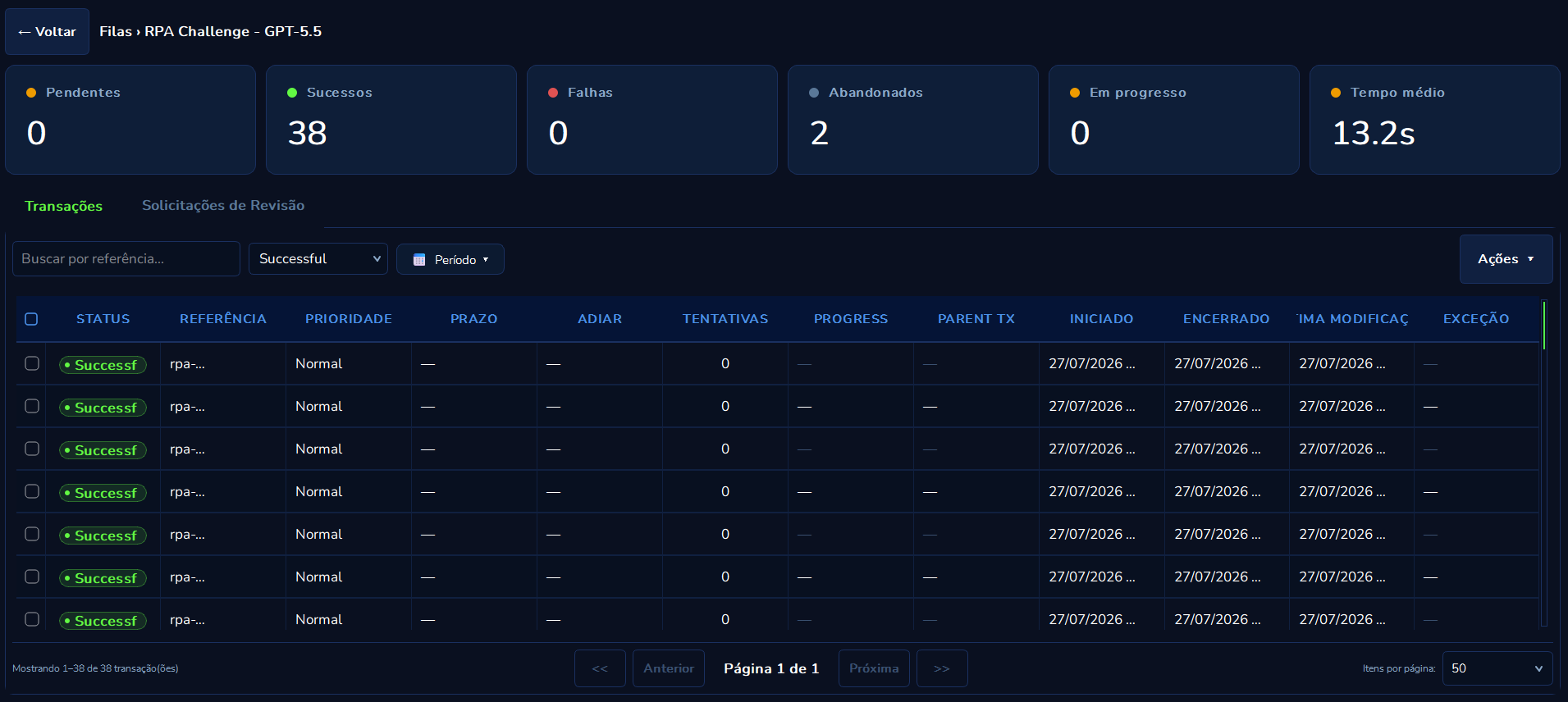



Queues

image
image
image
Version: 2.1.9
© 2025 PYE Tech. All rights reserved.

11. Queue System

Curator's Queue System organizes automation work into processable and auditable units. A queue stores cases to be processed (the queue items), controls each item's priority, deadline, and status, and distributes those items to automations safely, without duplication.

The working model follows two complementary roles:

Role Responsibility
Dispatcher Automation that feeds the queue: collects data from spreadsheets, APIs, or databases, validates, and creates the items.
Performer Automation that consumes the queue: reserves one item at a time, executes the processing, and records the result.

This separation allows scaling processing across multiple machines, safely reprocessing failures, and auditing each case individually. Modeling details, lifecycle, and best practices for each item are in the Queue Items section.

12. Queue Items

A queue item is the smallest unit of work Curator controls within a queue. It represents a specific case to be processed by an automation, with input data, status, priority, result, history, and audit information.

This section explains how to model, create, track, and reprocess queue items safely.

What is a queue item

Think of the queue item as a work ticket. The ticket says what needs to be done, what the priority is, what the deadline is, which automation is processing it, and what the result was.

  • In an invoice queue, each item can be an invoice.
  • In a customer queue, each item can be a registration.
  • In a billing queue, each item can be a bill.
  • In a document queue, each item can be a file to validate.

The item should contain only the data needed to execute and audit that case. Avoid using the queue as a repository for large files, full logs, or sensitive information not required by the process.

Conceptual structure

A queue item usually has the following groups of information:

Group Content
Identification Business reference and identifiers visible to the operation.
Control Status, priority, deadline, and postponement.
Input Data the automation receives to execute.
Output Data the automation records after completing.
Failure Error type and reason, when applicable.
Audit Agent, machine, start, end, comments, and history.
Retry Attempt number and link to the previous attempt, when applicable.

Reference

The reference is the item's main business identifier. It helps operators, analysts, and automations recognize the item without relying on a technical identifier.

Good references

  • NF-2026-000123
  • PED-88421
  • CLIENTE-1024
  • CONTRATO-2026-55
  • FILIAL-03|BOLETO-99182

Avoid references

  • Generic ones, such as item1, row2, test.
  • Dependent on spreadsheet order when the spreadsheet can change.
  • Containing unnecessary personal data.
  • Containing tokens, passwords, secret hashes, or access keys.

When the queue requires a unique reference, two active items must not share the same reference. This reduces the risk of duplication in recurring processes.

Input data

Input data are the variables the automation will use to process the item. They must be structured and predictable.

Safe example:

{
  "cliente_id": "C-1024",
  "pedido": "P-9981",
  "valor": 1520.75,
  "moeda": "BRL",
  "data_vencimento": "2026-07-10"
}

Best practices

  • Use clear field names.
  • Standardize uppercase and lowercase.
  • Prefer ISO date format, such as 2026-07-10.
  • Separate business identifiers from long descriptions.
  • Avoid sending empty or irrelevant columns.
  • Avoid deeply nested structures if the automation doesn't need them.

Output data

Output data records the result produced by the automation.

{
  "protocolo_integracao": "ERP-381992",
  "resultado": "lancamento_realizado",
  "processado_em": "2026-07-10T14:32:00"
}

Use output data to

  • ✅ Store protocols from external systems.
  • ✅ Record IDs generated by integrations.
  • ✅ Support later reconciliation.
  • ✅ Give operators visibility without requiring technical logs.

Do not use output data to

  • ❌ Store extensive execution logs.
  • ❌ Store screenshots in base64.
  • ❌ Store credentials.
  • ❌ Duplicate entire documents when referencing a file in an appropriate location is enough.

Analytical data

Analytical data is optional measurement information. It helps explain how the item was processed.

{
  "tempo_processamento_ms": 18420,
  "tentativas_locais": 1,
  "etapas_executadas": 5
}

Use in moderation. Analytical data should help operate or improve the process, not replace observability tools.

Item status

New

The item is waiting to be processed. It can be delivered to a Performer when:

  • It belongs to the correct queue.
  • It is not postponed to the future.
  • It is within eligibility rules.
  • Its turn has come according to priority, deadline, and arrival order.

In progress

The item was reserved by an automation. While in this state, it should be treated as busy. Possible actions:

  • Wait for completion.
  • Check progress, if the automation is updating it.
  • Investigate if it has been stuck for an unusual time.

Success

Processing finished correctly. The item should not return to the queue unless there is a specific operational process to recreate or repeat the case. Check: output data, start and end times, responsible agent, and comments or history, if any.

Failed

Processing ended with an error. There are two main types:

  • Business failure: the item does not meet an expected rule.
  • Technical failure: there was a system, infrastructure, automation, or external dependency problem.

The decision to reprocess depends on this classification.

Abandoned

The item was closed without success and no longer competes for processing. This state is useful when the item should not be retried, but the record needs to remain visible.

Retried

The original item was replaced by a new attempt. The original record is preserved for auditing, while the new attempt returns to the flow as a processable item.

Deleted

The item was removed from active operation. Use with caution, especially in processes with auditing, reconciliation, or traceability requirements.

Business failure versus technical failure

Correctly classifying a failure is one of the most important parts of using queues.

Business failure

  • Invalid data.
  • Blocked customer.
  • Nonexistent document.
  • Value outside the rule.
  • Order already canceled.
  • Record rejected by target system validation.

Recommended behavior: close as a business failure and forward for correction, review, or manual handling.

Technical failure

  • Timeout.
  • Network instability.
  • External system down.
  • Unexpected screen.
  • Expired session.
  • Locked file.
  • Unexpected exception in the automation.

Recommended behavior: allow retry within controlled limits.

💡 Rule of thumb: If retrying now or on another machine can solve it, it's a technical failure. If retrying with the same data will fail again, it's a business failure.

Item priority

Priority influences processing order.

Priority When to use
critical Truly critical cases, such as month-end closing reprocessing with direct impact.
high Important items, such as a premium customer with a short SLA.
normal The common flow.
low Items that can wait, informational or low urgency.
⚠️ Warning: Avoid using priority as a way to fix modeling. If all items become high, the queue loses its ability to organize real urgencies.

Deadline

The deadline indicates by when the item should be completed. It helps the operator identify risk and helps the automation order urgent items. Use a deadline for:

  • Items with due dates.
  • Service promises.
  • Daily closings.
  • Regulatory windows.

Do not use a deadline when the date does not affect the operation. Meaningless fields tend to confuse queue reading.

Postponement

Postponement prevents an item from being processed before a date or time. Examples:

  • Process only after 08:00.
  • Retry on the next business day.
  • Wait for an external system to become available.
  • Reschedule an action that depends on a legal deadline.

A postponed item still exists in the queue but must not be delivered until the defined time arrives.

Progress

During processing, the automation can update a short progress message. Examples:

Etapa 1/4 - validando dados
Etapa 2/4 - acessando sistema
Etapa 3/4 - enviando informacoes
Etapa 4/4 - aguardando protocolo
  • Keep the message short.
  • Update only at relevant steps.
  • Do not include passwords, tokens, or sensitive data.
  • Use progress for long items, not for every small action.

Comments

Comments record human decisions and operational context.

Use comments to

  • ✅ Explain why an item was abandoned.
  • ✅ Record reprocessing guidance.
  • ✅ Inform that a data point was fixed at the source.
  • ✅ Request review from another team.

Avoid comments for

  • ❌ Extensive technical logs.
  • ❌ Full stack trace copies.
  • ❌ Unnecessary personal data.
  • ❌ Sensitive information.

History

History records the item's important events, such as creation, status changes, retries, comments, and operational changes. It should allow answering:

  • When did the item enter the queue?
  • When did processing start?
  • Who processed it?
  • What was the result?
  • Was the item retried?
  • Was there manual intervention?

Item retry

Retry must be controlled by a clear policy. Before retrying an item, check:

  • Was the failure technical?
  • Is the external system back up?
  • Is the input data still valid?
  • Is the automation idempotent?
  • Is the number of attempts still acceptable?
💡 Idempotency: It means retrying the processing does not create duplicates or unwanted side effects. For example, if the automation creates an entry in an ERP, it should check whether the entry already exists before creating another.

Manual retry

Use manual retry when an operator has reviewed the item and decided to try again. Common scenarios:

  • An external system came back online.
  • A data point was fixed at the source.
  • An automation parameter was adjusted.
  • A one-off failure was resolved.

Manual retry must preserve the history of the previous attempt.

Automatic retry

Use automatic retry for predictable, transient technical failures. Configure a small limit initially. Avoid:

  • Infinite retry.
  • Many retries in a short interval.
  • Automatic retry for business errors.
  • Automatic retry without monitoring.
⚠️ Warning: A high number of retries can hide real problems, consume resources, and delay healthy items.

Data size and format

  • Keep each item small.
  • Prefer simple JSON objects.
  • Store large files outside the queue and reference only the path or ID.
  • Break large batches into several smaller items.
  • Standardize field names between Dispatcher and Performer.
  • Avoid fields with varying types between rows, such as value sometimes text, sometimes number.

Bad modeling example:

{
  "linha_inteira_da_planilha": "... centenas de colunas ...",
  "pdf_base64": "... conteudo enorme ...",
  "campo_sensivel": "nao_incluir"
}

Better modeling example:

{
  "documento_id": "DOC-8831",
  "cliente_id": "C-1024",
  "arquivo_ref": "documentos/DOC-8831.pdf",
  "tipo": "nota_fiscal"
}

Sensitive data

🔒 Security: Do not put in the item: passwords, tokens, API keys, database credentials, private keys, session cookies, personal data without operational need, or temporary secrets.

When a process requires sensitive information, prefer secure configuration mechanisms, a secrets vault, or controlled injection by the execution environment. The queue should contain only references and indispensable data.

Creating items from a spreadsheet

Each spreadsheet row can become an item. The first row must contain clear headers. Header example:

reference | cliente_id | pedido | valor | prioridade
  • Ensure reference is unique when the queue requires it.
  • Remove blank rows.
  • Standardize date formats.
  • Review columns before running the Dispatcher.
  • Avoid helper columns that won't be used by the automation.

Creating items from API or database

When data comes from an API or database:

  • Filter only eligible records.
  • Transform the format to the contract expected by the Performer.
  • Define a stable reference.
  • Enqueue in batches when there is high volume.
  • Record how many items were created and how many were skipped.
  • Handle duplicates before sending, when possible.

Contract between Dispatcher and Performer

The Dispatcher and Performer must agree on the data format. Before going to production, define:

  • Which fields are required and which are optional.
  • Expected types of each field and allowed values.
  • How dates and monetary values should be represented.
  • What to do when a required field is missing.

Contract example:

{
  "reference": "obrigatorio, texto unico por pedido",
  "cliente_id": "obrigatorio, texto",
  "pedido": "obrigatorio, texto",
  "valor": "obrigatorio, numero positivo",
  "data_vencimento": "opcional, data ISO"
}

Validation rules

Validate early. The sooner a data error is found, the lower the operational cost. Recommended validations:

  • Required fields present.
  • Correct types.
  • Numeric values within acceptable range.
  • Valid dates.
  • Non-empty reference.
  • Acceptable payload size.
  • Sensitive data absent.

If validation finds an error before enqueueing, ideally do not create the item. If the error appears during processing, classify it as a business failure when it is an expected rule.

Inspecting an item

When opening an item in Curator, review:

  • 🔖 Reference, status, and priority
  • 📅 Creation date, processing start and end
  • 🖥️ Responsible agent or machine
  • 📥 Input and output data
  • ⚠️ Failure type and reason
  • 📝 History and comments

This reading is usually sufficient for operational triage without exposing internal development details.

Deciding what to do with a failure

  1. Read the failure reason.
  2. Identify whether it is business or technical.
  3. Check for previous attempts.
  4. Compare with other items failing in the same period.
  5. If business, forward for correction or close.
  6. If technical and the cause was resolved, retry.
  7. If there are many identical failures, stop the automation and investigate the root cause.

Recommended item pattern

For most processes, a good item has:

  • reference: unique business identifier.
  • priority: initial priority, usually normal.
  • Input data with small, clear fields.
  • Deadline when there is an operational commitment.
  • Output data only on success.
  • Clear failure reason when there is an error.
{
  "reference": "PED-88421",
  "priority": "normal",
  "specific_data": {
    "cliente_id": "C-1024",
    "pedido": "88421",
    "valor": 1520.75
  }
}

Checklist before publishing a queue to production

  • ☑️ The item reference is unique and understandable.
  • ☑️ The data format has been documented.
  • ☑️ The Performer handles business and technical failures separately.
  • ☑️ Automatic retry has a limit.
  • ☑️ The automation is idempotent.
  • ☑️ Large items were replaced by references to external files.
  • ☑️ Sensitive data has been removed.
  • ☑️ Operators know how to review failures.
  • ☑️ Retention is aligned with company policy.
  • ☑️ The flow has been tested with success, business failure, and technical failure.

13. Queue Operations and Best Practices

This section guides the operational use of Curator's queue system, focusing on day-to-day behavior, governance, monitoring, and diagnostics.

Operational goal

A healthy queue should allow the team to quickly answer:

  • How many items are waiting to be processed?
  • Which items are being processed right now?
  • How many items finished successfully?
  • Which failed and why?
  • Did any automation stop or slow down?
  • Is the input volume greater than the processing capacity?
  • Is retry helping or hiding a recurring failure?

Curator centralizes this information so the team does not depend solely on local logs, manual spreadsheets, or scattered messages between operators.

Recommended monitoring routine

Daily

  • Check queues with many accumulated new items.
  • Review failed items.
  • Confirm whether items have been processing for an abnormal time.
  • Analyze whether failures are business or technical.
  • Check whether the expected Performers are running.
  • Manually reprocess only items whose cause is understood.

Weekly

  • Review the main failure causes.
  • Adjust Dispatcher rules to reduce invalid items.
  • Check whether priorities are being used correctly.
  • Evaluate whether the number of Performers is sufficient.
  • Review abandoned items.
  • Check whether the retention policy remains adequate.

Before important changes

  • Test with a staging queue.
  • Validate sample items with success, business failure, and technical failure.
  • Confirm idempotency in the target system.
  • Document changes to the item contract.
  • Align with operators on how to act on new failure types.

Important indicators

Accumulated new items

They indicate demand waiting to be processed. Possible causes of growth:

  • Dispatcher created more items than usual.
  • Performers are not running or are slow.
  • Many items are postponed to the future.
  • Priorities are concentrating processing on another group.

Recommended action: check whether Performers are active, evaluate whether parallelism should be increased, check for source volume changes, and validate the Dispatcher did not create duplicates.

Items processing for too long

They indicate an automation reserved the item but has not finished yet. Possible causes:

  • Genuinely long process.
  • Slow external system.
  • Stuck automation.
  • Machine turned off or interrupted.
  • Step waiting for improper interaction.

Recommended action: check item progress, review automation logs, confirm the machine is still active, and if needed, close or abandon the item per internal procedure.

Increase in business failures

It indicates a data quality problem or a business rule change. Examples: many blocked customers, invalid documents, nonexistent orders, values out of range, missing required fields.

Recommended action: adjust validation in the Dispatcher, fix the data source, update the automation's business rule, and guide the team responsible for the input.

Increase in technical failures

It indicates instability in automation, environment, or external system. Examples: timeouts, login errors, target system down, layout changes, network failure, locked files.

Recommended action: check target system availability, verify credentials and permissions, run one item manually in a controlled environment, pause excessive retries if the cause is still active, and fix the automation before mass reprocessing.

Failure triage

  1. Group failures by similar reason.
  2. Check whether they occur in many or few items.
  3. Confirm whether they started after a change.
  4. Classify as business or technical.
  5. Define the action: fix data, fix automation, wait for the external system, or reprocess.
  6. Record a comment on relevant items when there is a human decision.
  7. Reprocess only when the cause has been removed or there is a real chance of success.

Safe use of retry

Use retry when

  • ✅ The error is temporary.
  • ✅ The external system is back.
  • ✅ The automation was fixed.
  • ✅ The operation accepts a new attempt.
  • ✅ The process is idempotent.

Do not use retry when

  • ❌ The data is wrong.
  • ❌ The customer is blocked.
  • ❌ The document does not exist.
  • ❌ The error repeats across all items.
  • ❌ The root cause is still active.
⚠️ Warning signs: The same item fails multiple times for the same reason; many items enter retry at the same time; the queue looks busy but does not complete items; retry increases load on an already unstable system.

Idempotency

Idempotency is the ability to repeat an operation without generating a duplicate effect. In queues, it is essential because an item can be retried after a technical failure, machine crash, or manual retry.

Idempotent practices

  • ✅ Before creating an order, check whether it already exists by reference.
  • ✅ Before posting an invoice, check whether the protocol has already been generated.
  • ✅ Use a unique business key in the target system.
  • ✅ Record output with a protocol for reconciliation.
  • ✅ Avoid irreversible actions without prior verification.

Risk examples

  • ❌ Always create a new record without checking for duplicates.
  • ❌ Send an email every time the item is retried, without control.
  • ❌ Settle or pay a bill more than once.
  • ❌ Update final status without confirming the previous state.

Queue design for scale

  • Divide work into independent items.
  • Run multiple Performers on the same queue when the process allows.
  • Avoid overly large items.
  • Avoid sequential dependencies between items in the same queue.
  • Use priority and deadline to guide the order.
  • Monitor bottlenecks before increasing parallelism.
💡 Tip: Not every process should be parallelized. If two items compete for the same external resource or must follow strict order, consider creating separate queues or using a partitioning rule.

Separation into queues

Create separate queues when:

  • The processes have different rules.
  • The responsible teams are different.
  • The SLA is different.
  • The volume is very different.
  • The consuming agents are different.
  • One process's priority should not interfere with the other.

Avoid creating separate queues just for temporary convenience. Many non-standardized queues make operations and monitoring harder.

Recommended naming

Use names that describe process and scope.

Good examples

  • Faturamento - Notas de Servico
  • Financeiro - Baixa de Boletos
  • Cadastro - Clientes Pendentes
  • Compras - Pedidos para Integracao

Avoid

  • Fila Teste
  • Robo Novo
  • Processo 1
  • Producao Final Final

If there are separate environments, use a consistent pattern, such as:

Homologacao - Cadastro Clientes
Producao - Cadastro Clientes

Data contract

Every production queue should have a minimum data contract. Document:

  • 📌 Queue name and objective
  • 👥 Who feeds it and who consumes it
  • 📋 Required and optional item fields
  • 📄 Example of a valid item
  • 🔖 Reference rules and priorities used
  • ⚠️ Business and technical failure criteria
  • 🔄 Retry procedure

This contract prevents the Dispatcher from sending a format the Performer does not know how to process.

Staging checklist

Before releasing a queue to production:

  • ☑️ Create a valid item and confirm success.
  • ☑️ Create an item with a business error and confirm business failure.
  • ☑️ Simulate a technical error and confirm retry or controlled technical failure.
  • ☑️ Validate unique reference.
  • ☑️ Test an item with high priority.
  • ☑️ Test a postponed item, if the process uses postponement.
  • ☑️ Confirm output data, comments, and history.
  • ☑️ Run two Performers in parallel, if there is horizontal scaling.
  • ☑️ Confirm no duplication occurs in the target system.
  • ☑️ Review that no example, log, or payload contains improper sensitive data.

Operating with the Dispatcher

The Dispatcher must be predictable and auditable. Best practices:

  • Record how many records were read from the source.
  • Record how many items were enqueued.
  • Record how many were skipped and why.
  • Validate required fields before enqueueing.
  • Use unique references whenever possible.
  • Avoid enqueueing data the Performer will certainly reject.
  • Prefer batch enqueueing for large volumes.
⚠️ Warning: If the Dispatcher runs periodically, ensure it does not create duplicates on each run.

Operating with the Performer

The Performer must be clear when finishing each item.

Best practices

  • ✅ Fetch one item at a time.
  • ✅ Record success only after confirming the effect in the target system.
  • ✅ Record business failure when the rule rejected the item.
  • ✅ Record technical failure when there was instability or an unexpected error.
  • ✅ Update progress on long processes and fill in useful output data.
  • ✅ Terminate correctly when the queue is empty.

Avoid

  • ❌ Catching an error and marking success anyway.
  • ❌ Turning every error into a business failure.
  • ❌ Retrying infinitely without criteria.
  • ❌ Processing items outside the queue that should be audited.

Operational security

🔒 Rules for safe use:
  • Never publish credentials in documentation, screenshots, or examples.
  • Never put secrets inside queue items.
  • Use fictitious data in training and tutorials.
  • Restrict access to production queues.
  • Avoid exporting items with sensitive data unless necessary.
  • Review retention per company policy and delete or anonymize data when required by governance.

Troubleshooting

The queue is empty, but the Dispatcher ran

  • Did the Dispatcher point to the correct queue?
  • Does the user have access to that queue?
  • Did the source data have eligible records?
  • Was there a validation failure before enqueueing?
  • Is the queue you're looking at from the correct environment?

The Performer terminates without processing

  • There are no new items.
  • All items are postponed.
  • The queue configured in the Performer differs from the one being fed.
  • The Performer is using a different environment or account.

The item stays processing for too long

Possible causes: long process without progress updates, stuck automation, slow external system, or interrupted machine.

Action: check machine and logs, review progress, and decide whether to wait, abandon, or reprocess.

Many items fail for the same reason

Possible causes: the data source changed, the business rule changed, the target system changed, a credential or permission expired, or the automation became outdated.

Action: pause mass reprocessing, fix the root cause, test with a few items, and resume processing gradually.

Duplicate items appear in the queue

Possible causes: unique reference disabled, Dispatcher generated different references for the same case, the data source contains duplicates, or the periodic run was triggered more than once.

Action: standardize the reference, enable unique reference control when applicable, handle duplicates in the Dispatcher, and review scheduling.

Priority does not seem to work

  • Did the items actually receive different priorities?
  • Are there items with deadlines or operational rules influencing the order?
  • Is the Performer consuming the expected queue?
  • Were all items marked with the same priority?

Mass reprocessing procedure

  1. Confirm the original failure cause.
  2. Confirm the cause was resolved.
  3. Separate a small sample.
  4. Reprocess the sample.
  5. Validate in the target system.
  6. Monitor side effects.
  7. Reprocess the rest in batches.
  8. Document the decision.
⚠️ Warning: Avoid mass reprocessing during active instability. It can increase load, generate new failures, and hinder diagnosis.

Retention and cleanup

Define how long finished items should remain available. Consider:

  • Audit needs and internal compliance rules.
  • Monthly item volume and storage cost.
  • Data sensitivity.
  • Need for historical reports.

Do not keep data forever without justification. Also, do not remove data too early if the operation needs traceability.

Incident response pattern

When a critical queue has a problem:

  1. Identify affected queues.
  2. Pause Dispatchers if they are improperly increasing the volume.
  3. Check whether Performers should continue or pause.
  4. Classify impact: delay, duplication, integration failure, or loss of visibility.
  5. Preserve operational evidence.
  6. Fix the root cause.
  7. Reprocess only when safe.
  8. Record the conclusion and preventive action.

Responsibilities

A mature operation usually separates responsibilities:

Role Responsibility
Process owner Defines business rules, SLA, and success criteria.
Automation developer Implements Dispatcher, Performer, and error handling.
Operator Monitors queues, reviews failures, and executes approved procedures.
Administrator Manages access, environments, configurations, and retention.

This separation reduces the risk of changes without visibility and improves incident response.

Quick queue health checklist

  • ☑️ Are new items accumulating above normal?
  • ☑️ Are items processing for too long?
  • ☑️ Has the success rate dropped?
  • ☑️ Have technical failures increased?
  • ☑️ Do business failures indicate a source problem?
  • ☑️ Is retry within the expected limit?
  • ☑️ Are the Performers active?
  • ☑️ Has the data contract changed recently?
  • ☑️ Do operators know what to do with recurring failures?
  • ☑️ Is the queue free of unnecessary sensitive data?

Summary

Queues make automations more traceable, scalable, and operable. The feature's value increases when the team models items well, separates business and technical failures, controls retries, monitors indicators, and avoids exposing sensitive data. To go deeper, also read Queue System and Queue Items.

14. Logs and Execution History

The Logs tab maintains a complete history of all executions, allowing filtering by project, text search, and export.

Status Meaning
INFO Normal processing event
WARNING Attention, but not critical
ERROR Something went wrong
SUCCESS Operation completed successfully